Showing posts with label tentang alpro. Show all posts

Friday, May 24, 2013

Refleksi [ALPRO]--WEEK 8-- selection ARRAY

halooo ger bro and sist... nahh ketemu lagi nie samak berjumpa alpro setelah selang UTS ,, nah masih seputar ARRAY nie pembahasan kita.. tapi asal tau aja.. itu membuat kacau pikiran aku.. hahahaha...
makin dalam makin waow aja konsepnya.. ada selectionnya, merge,sorting.. buanyak dah.. mau tau? penasaran sama alpro.. kunjungi dan daftarkan diri anda ke UAD 3.. hahahahhah :D

Monday, April 22, 2013

Refleksi [ALPRO]--WEEK 7-- ARRAY (bukan vokalis NOAH)

nie pertemuan ke tujuh, berarti udah detik -detik mendekati UNAS.. ehh  maksudnya UTS.. hahahaa..
kali ini Pak We memberikan tugas tentang array sedikit sih tapi gag mudengnya buanyak.. secara logika bisa, tapi kalo udah masuk ke coding,, pasti tau deh.. bikin pikiran kusut.. dan ini ciyus lho.. hahaha
semoga saja besok UTS soalnya sulit,, (Lhoh gimana to?) maksudqu cukup bisa mengerjakan.. yang penting terus semangat.. karena ini awal yang baru yang kupilih..

Thursday, April 18, 2013

Refleksi [ALPRO]-- WEEK 6 REKURSIF PART 2

minggu ke 6,,,

alpro kali ini masih seputar Rekursif ger,, agak njlimet2 gimana gitu.. hahaha dan juga ada Quis untuk pembukanya.. woww amazing kan !!.. susahnya bookk...
kita dapet tugas ger , dan tugasnya itu masyaalloh susahnya waooow dehh.. mentoring aja sampe mentornya juga gag paham.. gawat gag tu.. dan tiktoktiktok waktu terus jalan , karena pengumpulannya sore jadi kita semua menggalau mencari keajaiban.. da akhirnya .... jeng..jeng.. satu soal terjawab padahal ada 3 soal yang diberikan... :3
tapi mendinglah disyukuri dari pada gag sama sekali.. hihihihihi..
minggu berikutnya lebih baik aja semoga.. dan tetap no 1 untuk the last class (D) :DDD

Friday, April 5, 2013

Refleksi [ALPRO]-- WEEK 5 Quis_Fungsi Rekursif

lalalalala yeyeyeyeyey..
.hari ini QUIIISS ger.. luar biasa degdegannya ... sepertinya pertanyaan langsung muncul di atas kepala,, kira-kira apa ya? trus sulit gag yaa? bikin galau deh hari- harinya.. but hari ini amazing.. kalo dibilang sukses sih belum ger, tapi berhasil mesti belum sempurna banget.. hahahah
kuis berhasil di kirim dan banyak lagi yang ngirim.. kereeeennn istimewa.. 

menuju ke materi,,
minggu ke lima kita membahas mengenai fungsi..(function) 
susah susah gampang dan ribet tapi mulus.. hahaha apa sih..
fungsi rekursif yang kita bahas kali ini, ada model go down, and going up,, tapi masih ribet aq.. gag begitu paham.. tapi ya harus paham... hahahaha coz besok ditantang buat quizz.. waahh pak Wee tuman ngasih kuis kayaknya.. PIss pak !:p..

tapi gag masalah.. yang pasti minggu depan harus bisa ngerjain kuisnya.. fighting semuanya !!!! :*

Tuesday, April 2, 2013

Refleksi [ALPRO]-- Week 3 kondisional

minggu ketiga belajar memilih nie ger.. maksudnya mempelajari tentang suatu kondisi gtuu.. 
macamnya da :
if..else
if.. else..if
while

nah kita bisa nentuin antara yes or no dengan fungsi2 tersebut ger.. begitu kiranya.. 
lanjuuut ke looping minggu depan :D

Refleksi [ALPRO]-- Week 4 looping (bukan loving ya...)

 minggu keempat

 kali ini agak telat 3 menit ger.. upss cape deh..
minggu ke tiga ini pak We ngajarin tentang looping meskipun kurang dong tapi ya harus dong.. (maksa deh)
untungnya semua udah ku siapin dari semalem ger.. kalo nggak gawat..  harus beli kerjaan punya temen ,, kagak demen deh gue..
sebenernya aq sedikit galau sih tentang peraturan minta beli,  ngopi 5rb kaya gt,, tau sendirilaahh orang tu kalo dah masalah financial kadang sensitiv, dan ujung-ujungnya jadi dendam dan persaingan sengit... ugh gag asik tu..
 tapi semoga lancar deh kedepannya.. seandainya semua bekerjasama pasti keren nie kelas.. rata.. gag ada namanya iri..tapi ya gmana lagi nie tentang banyak orang... semangat aja deh buat loopingnya..


Friday, March 22, 2013

Refleksi [ALPRO]--Why Teknik Informatika ????

selamat sore GerbRo dan Gersist sekalian.. kali ini aku akan menjawab benyak pertanyaan yang berputar-putar di kepalaku.. (kaya lalat).jadi kenapa aq memilih Teknik informatika? why? why? why? karena itu pilihanku ger.. menjadi seorang engineer khususnya di bidang IT.. karena seiring perkembangan jaman dan yang selalu dibuntuti dengan perkembangan teknologi yang membabi buta, aq gak pengen ketinggalan informasi itu ger dan aq ingin menciptakan suatu teknologi yang akan membantu perkembangan jaman selanjutnya Ger.. hahaha mau ciptain apa ya Ger kira-kira? nahh untuk pelajari suatu teknik dalam teknologi itu aku pilih lewat jalur informatika ini.. meskipun banyak jalur-jalur lain yang bisa mengantar ku ke tahap itu.. semoga sukses dehh.. amiiinn !!
begini Ger apabila kita mampu bekerja dan dapat menciptakan sesuatu pastinya harus didasari dengan modal  lisan (maksudnya promosi ini), biar hasil karya kita dapat terpublikasi Ger dan dapat royalti.. hmmmm asiiiknyaa... dan yang pasti iu gag dikit ger.. soal uang kan yang penting cukup untuk hidup.. kalo kelebihan juga gak papa kok.. :DDDD

Monday, March 18, 2013

Refleksi [ALPRO] WEEK 2--Sekuen

Masih seputar ALPRO nie Ger... minngu ke dua untuk mata kuliah ALPRO.. wooowww AMEZING !!!
masuk pagi-pagi jam 7, tapi kali ini gag telat Ger,, hahaha. sungguh makul yang mendebarkan sekali kalau dipikirkan.. tapi positif thinking lah buat kebaikan aku.. hahaha

masuk jam 7, langsung deh pak dosen menagih semua tugasnya daripendaftaran sampai tugas meringkas seputar pemrograman dari E-Book.  (untung udah di kerjain), apesnya di Ger. yang dikerjain ternyata salah kaprah.. salah buku maksudnya.. padahal udah dibela-belain bergadang semaleman tu buat nyelesaiin tugas(Proses-proses) tapi meringkas lewat deh , trus waktu itu lupa lagi belum download materi kuliah minngu ke dua ini Ger tentang masalah sekuen gitu (masalah lagi ini), yang parah lagi, aku gak bawa laptop waktu itu.. jan apes kali ya.. gapapa deh dibuaat pelajaran.. minngu selanjutnya semoga Jinak.. :D semangaaaat!!!!! :D

Sunday, March 17, 2013

top-down design


This time let's get technical voyeur Top-Down Ger,, let cool codingnya more .. : D
In addition to using existing information Ger, the programmer can use a top-down design techniques to simplify the development of algorithms and the structure of the resulting program. This time I will show top-down design and emphasizes the role of modular programming using functions for all of us ..
  check!!!

    A. Building Programs from Existing Information
  Programmers rarely start with a blank sheet of paper (or a blank screen) when they developed the program. Systems-thinking document, which comprises a description of the data requirements of these problems (developed during the analysis phase) and a solution algorithm (developed during the design phase), summarizes your intentions and thought processes. You can use this document as a starting point in the coding of your program.


 Function Library
  A.  Predefined Functions and Code Reuse
   The main purpose of software engineering is to write error-free code. Code reuse, reus-ing program fragments that have been written and tested, if possible, is one way to achieve this goal.
C standard math library defines a function named sqrt who calculate square roots. Function call in the assignment statement
y = sqrt (x);


first_sqrt = sqrt(first);  
second_sqrt = sqrt(second);  
sum_sqrt = sqrt(first + second);

B. Use of Color to Highlight New Constructs
 C. Library Functions 


   Top-Down Design and Structure Charts 

      
Functions without Arguments 
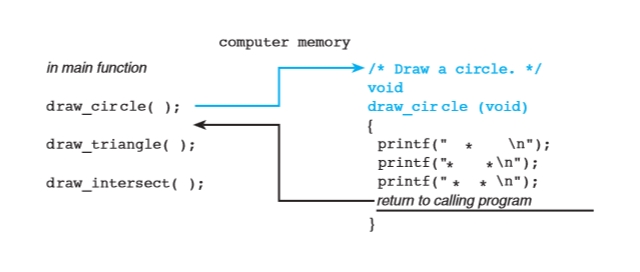
 One way that programmers implement top-down design in their programs is by defining their own functions. Often, a programmer will write one function subpro- gram for each subproblem in the structure chart. 


1.  Function Prototypes


2.  Function Definitions 


 3.Placement of Functions in a Program 


 Program Style
Use of Comments in a Program with Functions 
  Figure   3.14    includes several comments. Each function begins with a comment that describes its purpose. From now on throughout this text, the block comment and heading of each function definition are in color to help you locate functions in the program listing.
  
  Order of Execution of Function Subprograms and Main Function 
 Because the prototypes for the function subprograms appear before the main func- tion, the compiler processes the function prototypes before it translates the main function. The information in each prototype enables the compiler to correctly translate a call to that function. 


 Advantages of Using Function Subprograms 
 There are many advantages to using function subprograms. Their availability changes the way in which an individual programmer organizes the solution to a programming problem.
 

 procedural abstraction
  a programming tech- nique in which a main function consists of a sequence of function calls and each function is implemented separately  

Displaying User Instructions 
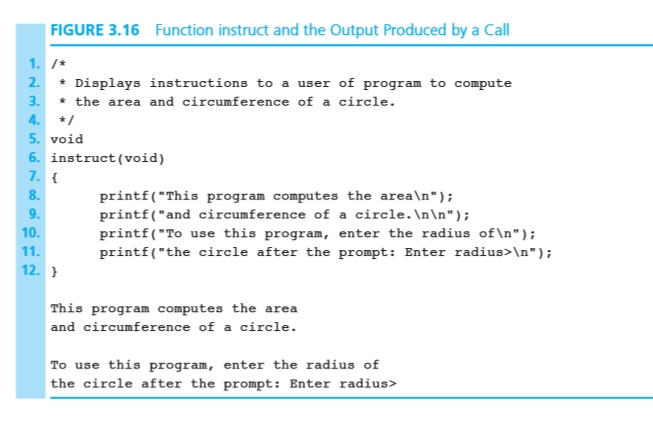
 The simple functions introduced in this section have limited capability. Without the ability to pass information into or out of a function, we can use functions only to display multiple lines of program output, such as instructions to a program user or a title page or a special message that precedes a program’s results.


     Functions with Input Arguments 
 Programmers use functions like building blocks to construct large programs. Functions are more like Lego® blocks ( Fig.   3.17   ) than the smooth-sided wooden blocks you might have used as a young child to demonstrate your potential as a budding architect. Your first blocks were big and did not link together, so buildings over a certain size would topple over. Legos, in contrast, have one surface with lit- tle protrusions and one surface with little cups. 

next hal 137 posisi 158

Computer Science as a Career Path


Haloo GerBro AND GerSist .. This time we will discuss a bit about a lot of questions that might come up when we make choices, one of them in order to choose a course and finally the desired career path, we can ask the important questions. Why did we choose this field? Are we able to work well? There will be jobs for us when we finish our education? Will we enjoy our work? true where further our position? This is related about life choices but not pasangn lhoo yaaa .. but about our career .. for a discussion of fault should let me check this time!!!!!

A.  Why Computer Science Field Maybe Right for You? 
  Reasons to Major in Computer Science 
The computer industry is one of the fastest growing segments of our economy and pledged to continue to see growth well into the future. To be competitive, companies must continue to employ trained professionals not only to produce high quality products for today, but also to plan creative scientific and engineering advances for the future.

The nature of the Computer Scientist 
 You want to build things that are useful to the people and that will have a positive impact on their lives.
To be successful in the workplace: You also have to be good communicators. You should be able to explain your plans and solutions both for both technical and non-technical. You should be able to write clearly and concisely in a technical environment. Fourth is the joy of always learning as a non-recurring nature of the work. Finally, there is the joy of working with the media is very obedient. Programmers can make in his or her imagination and easily deliver products that can be tested and easy to change and reset.

 B.  Computer Disciplines and Majors to Choose From 
Computing is a broad discipline that cuts other areas such as math-ematics, science, engineering, and business. Because such a wide selection, it is impossible for anyone to be an expert in all merekaMereka students who are also members of underrepresented minorities will find the field to be full of prospects.

  1. Computer science degrees 
  2. Computer Engineering Degree 
  3. Software engineering degrees 
  4. Electrical engineering department 
  5. Engineering colleges 
  6. Department of Computer Science 
  7. Level information technology 
  8. Business college 
  9. Information systems degree 
  10. Science lecture 


Computer Science 
   Computer science as a discipline covers a wide range of topics-cal and theoretical foundation for the development of cutting-edge algorithms. Work computer scientists are trained to do can be organized into three categories:
 • Design and implement software that is useful.
 • Designing new ways to use computers.
 • Develop effective ways to solve computing problems.

 Computer Engineering 
     For students who are more interested in understanding and designing the actual computing devices, many opportunities are available in computer engineering, which deals with the design and construction of computers and computer-based systems. Computer engineering degree involves the study of hardware, soft-ware, communications, and interactions between them, and a customizable mix with a bachelor's degree in Electrical Engineering Computer Science.

Information Systems 
    The information systems (IS) field focuses on integrating technology into the business and other companies to manage their information in a man-ner efficient and safe. In this area, the technology is seen as an instrument to produce, process, and distribute information. Therefore, the focus in this area is on the principles of business and organizations.

Information Technology 
    An Information Technology (IT) program prepares students to meet the needs of computer technology business, government, healthcare, schools, and other organizations. TI has an emphasis on the technology itself, more than the information that is handled, the theory behind it, or how to design hardware or software.

Software Engineering 
     Software engineering (SE) is the discipline of the development and maintenance of large software systems. This system should behave reliably and efficiently, be affordable, and meets all the requirements set for them. SE tried to integrate the theory of computer science and mathematics to practical engineering principles devel-oped for physical objects.

Mixed Disciplinary Majors
    Technology which opens the door to the field of study that combines different scientific or engineering field with computing. Higher education institutions have responded by offering a multidisciplinary graduate program for majors.
Bioinformatics is the use of computer science to store, analyze, and store biological data and to assist in          
 solving biological problems-usu-ally at the molecular level.
Artificial Intelligence (AI) is the implementation and study of systems that can exhibit autonomous  
 ntelligence or behavior. AI exciting research from many fields including computer science, psychology,
 philosophy, linguistics, neuroscience, logic, and economics. Applications include robotics, control systems,
 scheduling, logistics, speech recognition, handwriting recognition, natural language understanding, proving
 mathematical theorems, data mining, and face recognition.
 • Computer Forensics is a branch of forensic science pertaining to legal evi-dence that may be found in computers and digital storage devices. The col-reading of evidence must comply with the standards of acceptable evidence in a court of law. Computer forensics involves the fields of law, law enforcement, and business.
Cryptology (or cryptography) is the practice and study of hiding information and involve mathematics, computer science, and engineering. Electronic data security to trade, personal use, and to use the military continues to be important.
 • Mechatronics is the combination of mechanical engineering, mechanical engi-neering, and software tools in order to design advanced hybrid systems. Examples of mechatronics include production systems, inventor of planetary exploration, automotive subsystems such as anti-lock braking systems, and autofo-cus camera.
 computer science is probably the title that will open the door in the most diverse areas of computing.

 C. Career Opportunities 
This means that computer science are listed in the job description, or the type of degree you want, or recommended courses for the job. Suitable examples include engineers Computer Software, Computer Systems Analysts, Mathematicians, Computer Programmer, Web Designer and Developer, Secondary and Postsecondary Teachers, Statistics, Medical Records and Health Information Technicians, atmospheric scientists, and Market Research survey, economists, Radiation Therapist, Urban and regional planners, Surveyors and Mapping Technician, Conservation Scientists and Foresters, Travel Agencies, Private Detectives and Investigators, Geoscientists, psychologists, and Interpreter Translator. 

COMPUTER CATEGORY 
A. Electronic Computers Then and Now 

  FIGURE 1.1      
The Intel Atom processor chip contains the full circuitry of a central processing unit in an integrated circuit whose small size and low power requirements make it suitable for use in mobile internet devices. (Intel Corporation Pressroom Photo Archives)


FIGURE 1.2
(A) Desktop Computers, iMac. (© Hugh Threlfall / Alamy). (B) Hewlett Packard Laptop. (© Hewlett-Packard Company). (C) iPad. (© D. Hurst / Alamy). (D) an Android phone, the LG Thrill 4G. (© Handout / MCT / NewsCom).

 Hardware is the equipment used to perform the necessary calculations and includes a central processing unit (CPU), monitor, keyboard, mouse, printer, and speakers.
The software consists of programs that enable us to solve the problem with the computer by providing a list of instructions to perform

 In essence, consists mainly of the following components:
 ■ ■ Main memory secondary memory, which includes storage devices such as hard disks, CDs, DVDs, and
       flash drives Central processing unit
 ■ ■ input devices, such as keyboard, mouse, touch pad, scanner, joystick
 ■ ■output devices, such as monitors, printers, and speaker
 
Figure 1.3 shows how these components interact in a computer, with an arrow pointing in the direction of the flow of information

  Memory 
Memory is an important component in any computer. Let's see what it consists of and how a computer works with it.


Byte and Bits


A memory cell is actually a grouping of smaller units called bytes. Byte is the amount of storage required to store one character. The number of bytes of memory cell can contain varies from computer to computer. A byte consists of units smaller bits called storage (Figure 1.5).


   Main Memory 
program memory stores, Main data, and results. Most computers have two main types of memory: random access memory (RAM), which offers
store programs or data permanently. RAM temporarily stores programs while they are being executed (performed) by the computer
                                                           

  Storage Device 
computer systems provide secondary storage in addition to the main memory for two reasons. First, the computer needs a permanent or semi-permanent storage so that information can be held during power loss or when the computer is turned off. Second, the system typically store more information than fit in memory. Figure 1.6 shows some of the most common secondary storage and storage media.

Read-only memory (ROM) 
Part of the main memory that permanently store programs or data
volatile memory is memory that it lost when the computer is turned off
secondary storage unit such as a disk or flash drive that stores data even when the power to drive off    thin   disk of metal or plastic plate on the data represented by the magnetic spots arranged in tracks
   optical drive is a device that uses a laser to access or store data on CD or DVD
CD Hard disk Flash drive


  Central Processing Unit 
The central processing unit (CPU) has two roles: coordinating all computer operations and perform arithmetic and logic operations on data.

  Input / Output Devices 
We use the input / output (I / O) devices to communicate with the computer. In particular, they allow us to enter data for calculations and to observe the results of such calculations. You have to send that information to an output device called printer.

  Computer Networks 
A network that connects many individual computers and local area networks in a wide geographical area called a wide area network (WAN). The most popular WAN is the Internet, a network of universities, corporations, government, and public-access network. Internet is a descendant of the computer network ARPAnet project designed by the 1969 U.S. Department of Defense. The most widely used aspect of the Internet is the World Wide Web (WWW), the universe of Internet accessible resources are navigable through the use of a graphical user interface (GUI)
FIGURE 1.8


Wireless high-speed Internet to bring Internet data to your computer with the speed of several billion bits per second using the same coaxial cable that brings cable TV. Wireless communications and satellites provide data speeds comparable to cable.


computer software
 Taking repeated and instruction execution. In this section we focus on this all-important list of instructions called computer programs or computer software

  Operating System 


 The collection of computer programs that control the interaction of the user and the computer hardware is called the operating system (OS). Here is a list of some of the many responsibilities of the operating system:

  1. Communicate with computer users: take orders and carry them out or reject them with an error message. 
  2. Managing the allocation of memory, processor time, and other resources for various tasks. 
  3. Gather input from keyboard, mouse, and other input devices, and pro-viding data to the program is running. 
  4. Delivering the program output to the screen, printer, or other output device. 
  5. Accessing data from secondary storage. 6. Writing data to secondary storage. 

 You can see the directory of your hard drive (C :), backup drive (F :), optical drive (D :), or flash drive (E :) by double-clicking the appropriate icon.
 
Software applications
   Application program developed to help computer users in completing certain tasks.

Computer Languages 
 machine language is a set of num-bers binary. Another disadvantage of machine language is that it is not standard: There are machine language is different for each type of CPU.


Implementing Programs 
  To execute a machine language program, the CPU must check each instruction program in memory and sends command signals needed to carry out those instructions. Although the instructions are usually executed sequentially, as we will discuss later, is likely to have missed a few CPU instructions or execute multiple instructions more than once. During execution, data can be entered into memory and manipulated in some particular way. Instructions specific program that is used to enter or scan data from a program (called input data) into memory. Once the input data has been processed, instructions for displaying or printing values ​​in memory can be executed to display the results of the program. The lines displayed by a program called the program output.


D.  Method Development Software 
Programming is a problem-solving activity. If you are a good problem solver, you have the potential to become a good programmer. Therefore, one goal of this book is to help you improve your problem solving ability. Problem-solving methods are covered in a variety of subjects. Students learn to solve business problems with a systems approach, while engineering and science students use engineering and scientific method. Programmers use software development methods.

  Software Development Methods 

  1. Determine the requirements of the problem. 
  2. Analyze the problem.
  3. Design algorithms to solve the problem. 
  4. Implementing algorithms. 
  5. Test and verify the program is completed.
  6. Maintain and update the program. 


  ALGORITHM FOR PROGRAMMING PROBLEM 

  1. Get the data. 
  2. Perform calculations. 
  3. Displaying results. 

 Checking the table is an important part of the design of algorithms that are often overlooked. To check the algorithm table, you have to be careful doing every step of the algorithm (or its refinement) as the computer and verify that the algorithm works as intended. You will save time and effort if you find errors earlier algorithm in the troubleshooting process. .

  IMPLEMENTATION 
  Applying the algorithm (step 4 in the software development method) involves writing as a program. You have to change every step of the algorithm into one or more statements in a programming language.
  TESTING
  Testing and verifying the program requires completion of testing program to verify that it works as desired. Do not rely on just one test case. Run the program several times using different sets of data to ensure that it works correctly for every situ-ation is set in the algorithm.
  MAINTENANCE
  Maintain and update the program involves modifying a program to delete a previously undetected errors and keep up-to-date as changes in government regulations or company policy. Many organizations maintain the program for five years or more, often after the programmer who originally encoded have left or moved to another position. A disciplined approach is essential if you want to create a program that is easy to read, understand, and maintain. You must follow the accepted style guidelines program (which will be emphasized in this book) and avoid tricks and shortcuts programming.

E Professional Ethics for Computer Programmer 
As with other professionals, computer programmers and software designers system (called software engineers) must follow certain standards of professional conduct.

Privacy and Abuse Data 
 Programmers should always behave in a socially responsible manner and not take the information that they are authorized to see. A programmer that changed the information in a database containing financial records for his personal gain-for example, changing the amount of money in the bank account was guilty of theft computer or computer fraud. It is a crime that can lead to fines and imprisonment.

Computer Hacking 
  Secret or confidential information taken in this way have been sold to the intelligence agencies of other countries. Other hackers have tried to break into computers to retrieve information for their own amusement or as a joke, or just to show that they can do it. Of course, data theft and virus propagation can not be considered harmless pranks, they are illegal and carry serious penalties.

Plagiarism and Piracy Software 
 Using the program to others without permission is also unprofessional behavior. While it is certainly possible to use modules from the library that has been developed for reuse by programmers of their own company, you can not use another programmer private program or programs of other companies without getting permission first-ting.

Misuse of a Computer Resources 
  Computer system permissions or account user code is personal property. The privilege must be protected, should not be loaned or shared with anyone else and should not be used for purposes not intended.

Friday, March 15, 2013

Refleksi [ALPRO] WEEK 1--Kenalan ALPRO

Kuliah...
ALPRO.. what is ALPRO????
algoritma dan pemrograman begitulah kepanjangannya.. ini salah satu makul aku di semester ke dua ini ger.
pertemuan pertamannya sih sedikit galau.. karena denger-denger dari kakak tingkat dosennya sedikit WAOW buat tata tertibnya. kuliah jam 7 adalah jam kuliah yang sangat istimewa banget. tapi bukan masalah sih walaupun saat perkuliahan sedikit ngantuk gitu.. hahaha.. 

ohh iya kenalin nie Dosen alpro  UAD yang sangat kondang tertibnya.


Drs. Wahyu Pujiyono, M. Kom

  • NIY : 60910095
  • Jabatan : Lektor Kepala / III.C
  • S1 : FMIPA Matematika UGM Yogyakarta - Indonesia
  • S2 : Ilmu Komputer, UI Depok - Indonesia
  • Bidang Minat : Mobile, Enterprise System
  • Email : yywahyup@yahoo.com
  • Website : -

keren kan GEr.. cetar membahana kalo Syahrini bilang.. 
eiiits balik lagi ke per kuliahan,,makul alpro ini menurut aku seperti makul DDP, sepertinya sih (cuma sok tew) dan pastinya berhubungan dengan CODING (bukan kidding lho ya !), bikin kepala kriting kalo temen2 pada bilang,, alaaahh tapi kalo sugesti kita baik pasti bisa deh.. semoga aja bersahabat ma ALPRO .. keep FIGHTING semuanya,,  minta bantuannya ya Pak Wahyu.. SELAMAT DATANG BUAT ALGORITMA DAN PEMROGRAMAN.. :D

Computer Programming for Teens

Hallo GerBro And GerSist .. This time, I love to know how to control the computer so that they can do something over and Repeat, making decisions, and save INFORMATION In, The right holder
also about the algorithm, which is required in the design of solutions for the pro-blems and the programmer can code in a number of languages.
In this chapter the components:
A. hardware and software is important
B. The concept of digitizing
C. Binary digits, bits, bytes
D. Computers, electronic machine
E. Language: high level vs low-level

chek it !!!!

A. Hardware and Software 
Hardware are the parts of a computer that is hard or be touched.
Such as: printers, external drives, scanners, modems, and so on.
Software is a program that runs on a computer or computers that make it operate.
Such as: commercial programs, games, word processing applications, and others.
The application program is a program that is sold on the market, for example, WinZip, iTunes, Microsoft Office, Adobe Acrobat, Skype, and so on.
The system is a set of software programs that allow computers to store data, retrieve data, save files, delete files, and, in general, allow the computer to operate the application program.

Let's look at the main part of the computer list:
1. Keyboard: Used to communicate with the computer
2. Mouse: Clicking and interact with the graphical user interface (GUI).
3. Printer: giving a paper on what is on the screen
4. Hard drive
Hard drive is the computer's internal memory. Program applications are stored here, such as the file system. Think of your hard drive as a permanent storage space owned computers.
5. External Drive
The external drive is used to expand storage capacity beyond the computer itself. Such as: flash disk, cd / dvd, floppy disks, etc.
6. RAM (random access memory)
RAM is really a work space for the computer. Ram is also a storage space on the computer temporarily.
7. ROM (Read-Only Memory)
ROM is memory is not lost when the machine is turned off. Specific instructions for the computer are permanently etched into achip when the computer produced. So the ROM is permanent memory and never lost
8. CPU (computer processing unit)
CPU is the main part of the computer here occurred storage, processing, and retrieval of data. CPU manages all functions including data processing computer-manipulated data to transmit from one place to another or by doing some math on the data. CPU found in the unit system consisting of a computer's internal pieces like the motherboard, internal memory, and so on.
The contents of the CPU are:
1. ALU (Arithmetic / Logic Unit)
The ALU affect the programmer. When you write a program for a computer, the ALU to be       called into use to do some math (arithmetic section) or to evaluate the decision (the logic) by the programmer. That is why we need to unit
2. Control Unit

B. Digitizing & Binary digits, bits, bytes
Digitization of information means using numbers to represent something other than a number. We digitize the sounds, colors, and even pictures. Once digitized, they can be handled by a machine that can recognize two integers: 1 and 0.
To understand how the computer does what it does, imagine the four cities, is approximately the same, as shown in Figure 1.1. A bad snowstorm has closed several roads between cities while others are still open.


Between Mapleville and Glaston roads are closed, such as the road between Whittier and Mapleville. The road between Glaston and Berkeley open, and the streets between Berkeley and Whittier open. If the number one (1) is an open road, and the number zero (0) is a closed path, then the image can be redrawn to look like Figure 1.2.


Now you can describe the situation using the numbers:


The use of zeros and ones to describe the situation is the way it is digitization. What is described by English words, such as open and closed, has now been described by zero and one. Both numbers are called binary digit binary words'''' implies there are only two of them, especially the zero and one. Bit boldfaced term formed from the letters of the two words'' binary digits.''
Now let's expand on the situation

MAPLEVILLE? Glaston? BERKELEY closed open
If we digitize the answer, it would look like this:

MAPLEVILLE? Glaston? BERKELEY 01
If we drop all the English words, the answer would be two bits:

Read more:

Whittier? BERKELEY? Glaston open open
Now we digitize the answer:


The first one states that the road is open from Whittier to Berkeley, and 1 second is an open road from Berkeley to Glaston.
Now look at an expanded map of the area, shown in Figure 1.3, this time adding the names of cities and smaller towns in between the big cities.


 A description of the situation of Mapleville to Berkeley by Glaston will look like the following:
MAPLEVILLE? FURLEIGH? Glaston? Crantz? BERKELEY closed open open open 0 1 1 1
 
or just four bits:
 
If you want to describe the situation and the road started going through Furleigh Mapleville, Glaston, Crantz, Berkeley, Rosswood, Whittier, Jackson and back to Mapleville, you'll see bits

Each sequence of 8 bits is called a byte. So we just used the order of the bytes of information.
Binary digits, or bits, can be used to describe many situations in the real world apart from the conditions mentioned. When numbers or digits are used to represent a particular situation or a bit of information, we have digitized information.
C. Computers, electronic machine
Computers: An Electronic Engineering To be a good programmer, it is important to start with a few basics about how computers operate ..
Computers are electronic machines. Hence the need electricity to operate.
If we assign a zero (0) to its stop and bit one (1) to the flow, this bit can be connected to the internal workings of the machine.
The capacity of the machine to manipulate the electronic states are used to create a language of zeros and ones is called machine language. It is called machine language because it is the basic language of the machine. Without getting bogged down in the details, the computer reveals all information with the bits and bytes of machine language.
Now read these examples of some computer language:


D. Language Level: High and Low
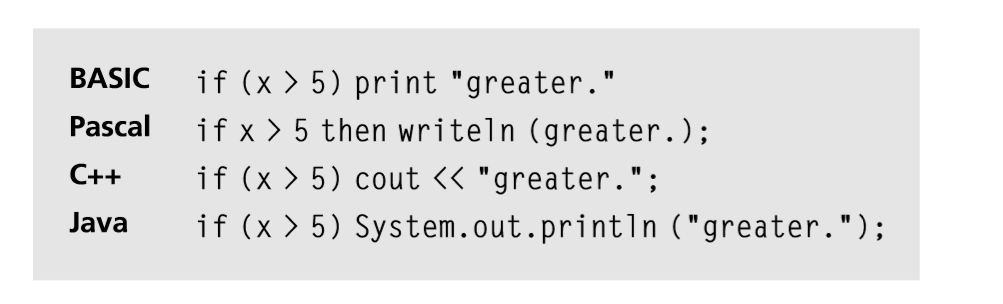
High Level Language High level languages ​​are languages ​​that'' high'' in the language of the computer languages ​​that machine'' natu-rally understood some''. High-level languages ​​are removed from the reality of how computers process data-that is, in terms of bits. Machine language is made of all the binary digits, but a high-level language using English words to give directions to the computer. In order to understand the high-level phrase, consider the fol-lowing analogy first.
using a high level language commands directly related to the problems are programmed as opposed to the internal workings of the machine.
callthecaterer, orderthefood, rentthehall, andsoon'' Pascal, Cobol, Fortran, Basic, C, Cþþ, Perl., and Java are examples of high-level languages. Note
For BASIC programmers, C may be considered as a low-level language, as it allows the programmer to have more control at a lower level than the BASIC programmer.
Maid Language: Translators Translators breaking high-level language code and low level into the machine language understood by the specific processor in the CPU. There are two types of interpreters: interpreters and compilers
Compilers Interpreters and translators can work in two different ways: as an interpreter or compiler. Inter-preters will translate one line of code at a time and generate an error message immediately. Compilers translate the entire file code once, not line by line. The compiler will not produce an error message until all codes have been translated. Original file or program that the programmer writes is called source code. Object code is the result of a translation and machine language version of the original file. Cþþ is an example of a compiled language, while BASIC is an interpreted one.
Note
Translators convert high-level language or low level language into machine language that is easily understood by a computer processor.
Algorithm: Basics for All Design for Programming Solutions
An algorithm is a set of steps to solve the problem. These steps can be repeated and may involve some decisions, like the choice of two or more things.

Consider the following example algorithm to purchase tickets to the movies.
1. Go to the theater.
2. The walk to the ticket booth.
3. Select the movie.
4. Pay the price.
5. Receiving tickets.

What about the algorithm for finding the smallest number among three numbers?
1. Compare the first number by the second number.
2. Dispose of a larger amount from step 1.
3. Compare the third number to the amount remaining.
4. Dispose of a larger amount from step 3.
5. Whatever amount is left is the smallest of the three.

Part Three of Each Algorithm An algorithm has three parts:
1. The steps are limited (eg, they do not last forever).
2. These steps can be repeated.
3. Step may involve decision-making.
End

Each step of the algorithm should follow the previous steps. If necessary, repeat several steps and skip the others if the decision calls for action.
Look at this short Cþþ program print the message'' Could you please say that again'' 250 times on a machine.?
 
Here is another version of the same program in Pascal.

Each example can be written in any language. The main point of this program is that they both contain a circle, which is another way of saying that a particular task is being executed repeatedly.
Programming depends on the ability to write clear, step-by-step solution called algorithms in a language. Some high level language and is easy to use, while others are more difficult languages ​​to learn because of their low level and closer to understanding.

copyright by nozhbitha
Older Posts Home

Nozh_Statistik

Selamat Datang, di Tunggu Ocehannya :) © copyright by Nozhbitha

Translate

Facebook Nozhbitha

Twitter-nozhbitha

Followers

copyright by Nozhbitha. Powered by Blogger.
 

Labels

Blog Archive